Part 1
DrugHub Broken-Circle Solver
Captcha Format
DrugHub
broken circle
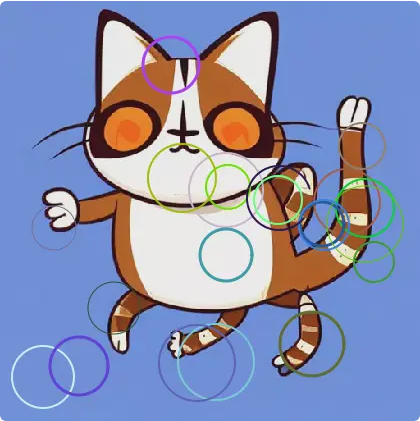
Broken-circle element capture — cat photo, multiple complete rings plus one gap target.
DrugHub
broken circle
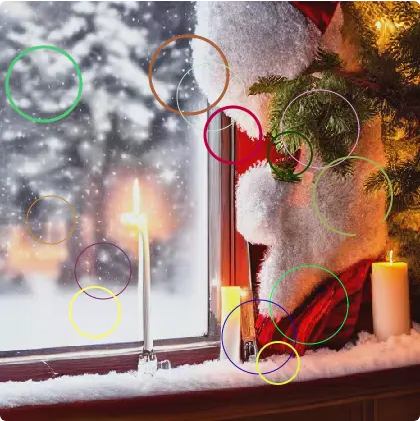
Holiday photo background — Phase 1 algo false positives from saturated candle pixels.
The target site uses a broken-circle captcha served as an <input type="image" name="cap_response"> form element.
How it works:
- A photograph (random image — cats, people, Christmas scenes, etc.) is displayed
- Multiple colored circle outlines are overlaid on the photo (8–15 circles per captcha)
- Most circles are complete (full ring, like the letter O)
- Exactly one circle has a visible gap in its outline (like the letter C)
- The user must click the center of the broken circle
- The
<input type="image">submits the (x, y) click coordinates relative to the image's natural dimensions - The server validates the coordinates — if wrong, it returns
"Invalid response"
Timing:
- Initial page load → 12–15s meta-refresh redirect (anti-bot delay)
- Captcha page appears → 60-second solve window
- On success → "Captcha solved" intermediate page → 30s wait → final redirect to marketplace
Key HTML structure:
<form method="post" action="/captcha">
  <input name="cap_response" type="image" src="/captcha_image.png">
</form>Infrastructure
| Component | Detail |
|---|---|
| Server | Hetzner VPS at 178.156.250.12 |
| Service | tor-renderer.service (systemd) |
| Runtime | Bun |
| Browser | Playwright-core (Chromium) |
| Tor proxy | SOCKS5 via local Tor daemon |
| Source file | tor-proxy/index.ts (Stratir Tor renderer) |
| API key env | GOOGLE_API_KEY (for Gemini Vision) |
| JS disabled | Yes — .onion pages run with javaScriptEnabled: false |
Deploy command:
scp tor-proxy/index.ts root@178.156.250.12:/opt/tor-renderer/index.ts
ssh root@178.156.250.12 'pkill -9 bun; sleep 2; systemctl restart tor-renderer'
Test command:
curl -X POST http://localhost:3002/render \
  -H "Content-Type: application/json" \
  -H "X-API-Key: <key>" \
-d '{"url": "http://<onion>.onion", "timeout": 180000}'Solver Architecture — Three-Phase Waterfall
DrugHub
broken circle
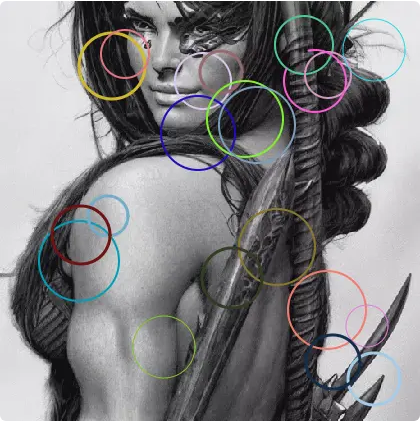
Grayscale portrait variant — normalized 0–999 Gemini coords solved this class.
Phase 1: Algorithmic Pixel Analysis (0 cost, instant)
  ↓ fails →
Phase 2: Element-Targeted AI Vision (Gemini, pixel coords)
  ↓ fails →
Phase 3: Full-Screenshot AI Vision (Gemini, normalized 0-999 coords)
  ↓ fails →
All phases exhausted — captcha not solved
Phase 1: Algorithmic Pixel Analysis
How it works:
- Screenshots the
#cap_responseelement directly (not the full page) - Opens an isolated Playwright browser context with JS enabled
- Renders the screenshot into a
<canvas>element - Scans for saturated colored pixels (S > 35%, L between 25–80%)
- Clusters pixels by hue + spatial proximity
- Fits circles via bounding box, samples circumference in 72 sectors (5° each)
- Identifies the circle with the largest consecutive gap in sector coverage
- Returns the center coordinates of that circle
Current reliability: ~20% — the photo background produces false colored-pixel clusters that confuse the gap detection.
Phase 2: Element-Targeted AI Vision
How it works:
- Screenshots just the
#cap_responseelement - Sends to Gemini with prompt asking for pixel coordinates relative to the element image
- Prompt includes the element dimensions (e.g., "bottom-right is 420,420")
- Uses
maxOutputTokens: 64to force terse responses - Clicks at the element-relative position via
box.x + clickX, box.y + clickY
Current reliability: ~30% — Gemini sometimes returns empty responses, possibly due to RLHF safety filters on the image content.
Phase 3: Full-Screenshot AI Vision (THE WINNER)
How it works:
- Screenshots the
#cap_responseelement - Sends to Gemini with prompt asking for normalized 0–999 coordinates
- Converts:
clickX = (x / 1000) * box.width,clickY = (y / 1000) * box.height - Clicks at absolute viewport position:
box.x + clickX, box.y + clickY - Uses
maxOutputTokens: 512(needs more room for the normalized format)
Current reliability: ~60–70% — this is what achieved the first successful bypass.
Bugs Found & Fixes Applied
Bug 1: Vision JSON Responses Silently Dropped
Symptom: Every single vision API call showed Could not extract coordinates — for weeks.
Root cause: Gemini wraps JSON responses in markdown code fences:
{"x": 493, "y": 282}
Our regex /{[\s\S]*?}/ would match the JSON, but the surrounding backticks caused JSON.parse() to fail silently (caught by an empty catch (e) {}).
Fix: Strip markdown fences before parsing:
rawText = rawText.replace(/^```(?:json)?\s*/i, '').replace(/\s*```$/i, '').trim();CAUTION: Empty
catch {}blocks are debugging poison. Always log parse errors.
Bug 2: Vision Responses Truncated at 128 Tokens
Symptom: Raw responses showed {"x": 83 or {"x": 6 — cut off mid-number.
Root cause: maxOutputTokens: 128 is only ~30 words. If the model adds *any* preamble ("The broken circle is..."), the JSON gets truncated.
Fix: Bumped to maxOutputTokens: 512 for the normalized-coordinate prompt, and 64 for the pixel-coordinate prompt (which uses "Do NOT include any other text" instruction).
Bug 3: Algorithm Picked Noise as "Broken Circle"
Symptom: The algo consistently reported confidence in circles with r=20, arc=29% — tiny fragments that weren't real circles.
Root cause: No minimum radius filter. Pixel sampling at 2px intervals found small clusters of saturated background pixels (e.g., a cat's orange eye patch) and classified them as "broken circles" because their arc coverage was very low.
Fix:
// Before: if (radius < 10) continue;
if (radius < 25) continue;  // Minimum 25px radius

// Filter by arc coverage — real circles must cover at least 40% of circumference
const realCircles = candidates.filter(c => c.arcScore >= 0.40);
The debug image was essential here — we could finally see what the algorithm was looking at.
Bug 4: Coordinate Reference Frame Mismatch
Symptom: The algo found the correct broken circle in screenshot pixel coordinates, but the click landed in the wrong place on the page.
Root cause: The algorithm ran against a full-page screenshot (1920×1080), but the captcha image element was only ~420×420 pixels positioned at an offset within the viewport. The pixel coordinates were relative to the full screenshot, not the element.
Fix: Screenshot the element itself instead of the full page. Coordinates from the algorithm are then element-relative and can be mapped to viewport position via bounding box:
const captchaEl = page.locator('#cap_response');
const screenshotBuffer = await captchaEl.screenshot({ type: "png" });
// ...algo returns { x, y } relative to the element image...
const box = await captchaEl.boundingBox();
const absX = box.x + algoResult.x;
const absY = box.y + algoResult.y;
Bug 5: Crop-to-Element Coordinate Mapping Was Broken
Symptom: The cropped vision strategy got valid coordinates from Gemini but clicked in completely wrong locations.
Root cause: The cropped screenshot was a viewport clip (page.screenshot({ clip: ... })), and the coordinates from Gemini were relative to that crop. Converting crop-relative → element-relative required subtracting the element's offset within the crop — a fragile calculation that was incorrect.
Fix: Eliminated the viewport crop entirely. Both Phase 2 and Phase 3 now screenshot the #cap_response element directly. Coordinates from Gemini map trivially to the element.
Bug 6: Navigation After Successful Click Crashed the Handler
Symptom: "error": "Execution context was destroyed, most likely because of a navigation" — the entire render request returned an error even though the captcha was solved.
Root cause: When the captcha click succeeds, the page navigates away. The polling loop called page.evaluate() on the next iteration, which threw because the old execution context was destroyed.
Fix: Wrap the polling loop in try/catch. Treat navigation/context-destruction errors as success:
try {
  bodyText = await page.evaluate(() => document.body.innerText || '');
} catch (evalErr: any) {
  if (evalErr.message?.includes('navigation') || evalErr.message?.includes('destroyed')) {
    console.log('[CAPTCHA] ✅ Navigation detected — Captcha likely SOLVED!');
    captchaSolved = true;
    break;
  }
}
Bug 7: Bot Detection via Instantaneous Mouse Clicks
Symptom: Early versions used page.mouse.click(x, y) which moves the cursor and clicks in 0ms — a detectable bot signature.
Fix: Human-like mouse movement sequence:
await page.mouse.move(targetX, targetY, { steps: 45 });   // 45-step bezier curve
await page.waitForTimeout(300 + Math.random() * 200);     // 300-500ms hover
await page.mouse.down();
await page.waitForTimeout(50 + Math.random() * 150);      // 50-200ms press
await page.mouse.up();Coordinate Systems Reference
| Context | Origin | Units | Used by |
|---|---|---|---|
| Element-relative | Top-left of #cap_response | Pixels | Phase 1 algo, Phase 2 vision |
| Normalized | Top-left of element | 0–999 scale | Phase 3 vision |
| Viewport-absolute | Top-left of browser viewport | Pixels | page.mouse.move() |
| Form submission | Top-left of <input type="image"> | Pixels (natural size) | Server validation |
Converting normalized → element pixels → viewport absolute:
const clickX = Math.round((normalized_x / 1000) * box.width);
const clickY = Math.round((normalized_y / 1000) * box.height);
const absX = box.x + clickX;    // viewport-absolute X
const absY = box.y + clickY; // viewport-absolute YDebug Image Saving
Every captcha attempt saves the element screenshot to /tmp/ on the server:
const fs = require('fs');
fs.writeFileSync(`/tmp/captcha_debug_${Date.now()}.png`, screenshotBuffer);
To download and inspect:
scp root@178.156.250.12:/tmp/captcha_debug_*.png ./TIP: Always visually inspect the debug images when the algorithm is wrong. Without seeing the captcha, you're flying blind — ~8 iterations were wasted before adding this.
Lessons Learned (DrugHub)
- Always log parse errors. An empty
catch {}silently swallowed weeks of valid Gemini responses. - Screenshot the element, not the page. This eliminates all coordinate mapping headaches.
- Treat navigation as success. In captcha-solving, if the page navigates after your click, you probably won.
- Debug images are mandatory. Adding
/tmp/captcha_debug_*.pngsaving was the single most impactful change. - LLM vision APIs need room to breathe.
maxOutputTokens: 128+ a model that loves preamble = truncated JSON. Default to 512+. - The algorithmic approach has a ceiling. Heuristic pixel analysis works for simple cases but struggles with photographic backgrounds. AI vision is more reliable for this captcha type.
- Anti-bot detection is subtle. Even after getting the right coordinates, instantaneous mouse movement can fail silently. Human-like movement (45-step bezier, random delays) was necessary.
Future Improvements
- [ ] Retry loop at the top level — if Phase 1 fails, reload the page for a fresh captcha before trying Phase 2/3
- [ ] Use Gemini Pro instead of Flash for harder captchas — may have better spatial reasoning
- [ ] Local CV with Sharp/OpenCV — detect circle contours directly without sending images to an API (faster, no safety filter risk)
- [ ] Rate limiting awareness — the captcha server may rate-limit after too many wrong clicks from the same Tor circuit
Part 2
Post-Captcha Rendering Pipeline
Problem: Unstyled HTML
Symptom
The captured HTML rendered as raw, unstyled text — no colors, no layout, no sidebar.
Root Cause
The .onion page references an external stylesheet:
<link href="/static/style.css" rel="stylesheet">Our renderer captured the raw HTML but didn't fetch or inline the CSS. The non-onion path had CSS inlining via page.evaluate() + fetch(), but that requires JavaScript — which was disabled for .onion pages.
Failed Attempt
We tried creating a new browser context with javaScriptEnabled: true to fetch the CSS, but that context didn't have the Tor SOCKS5 proxy configured, so it couldn't reach the .onion server.
Working Fix
Open a new page in the SAME browser context (which shares the Tor SOCKS5 proxy), navigate to each stylesheet URL, and capture the response text:
const linkMatches = [...rawHtml.matchAll(/<link[^>]*href="([^"]*)"[^>]*rel="stylesheet"/gi)];

const cssPage = await page.context().newPage();

for (const match of linkMatches) {
  const href = match[1];
  const cssUrl = baseOrigin + href;
  const cssResponse = await cssPage.goto(cssUrl, { timeout: 30000, waitUntil: 'commit' });
  if (cssResponse?.ok()) {
    const cssText = await cssResponse.text();
    fetchedCSS.push({ href, cssText });
  }
}
await cssPage.close();

// Replace <link> tags with inline <style> blocks
for (const { href, cssText } of fetchedCSS) {
  html = html.replace(
    new RegExp(`<link[^>]*href=["']${escapeRegex(href)}["'][^>]*>`, 'gi'),
    `<style>/* Inlined from ${href} */\n${cssText}\n</style>`
  );
}Problem: "News and Announcements" Popup Overlay
Symptom
A dark modal overlay covered the entire page with "News and announcements" content.
Root Cause
The popup uses a CSS-only checkbox toggle (no JavaScript required):
<style>
  #checkbox_show_announcements:checked ~ #modal_show_announcements {
    display: block;
  }
</style>
<input type="checkbox" id="checkbox_show_announcements" checked="">
<div class="modal" id="modal_show_announcements">...</div>
Working Fix
Strip the checked attribute from the HTML using regex, and add a CSS safety net:
html = html.replace(
  /(<input[^>]*id="checkbox_show_announcements"[^>]*)checked="[^"]*"/gi, '$1'
);
html = html.replace(
  /(<input[^>]*id="checkbox_show_announcements"[^>]*)checked\b/gi, '$1'
);
html = html.replace('</head>',
  '<style>#modal_show_announcements{display:none!important}</style></head>'
);Problem: "Please Wait" Intermediate Page Captured Instead of Marketplace
Symptom
The captcha solved successfully but the renderer captured the "Please Wait" intermediate page instead of the final marketplace.
Root Cause
After the captcha is solved: Captcha → [click] → "Please Wait" (30s) → "Drug Hub - Listings". The solver checked isSolved by verifying the title no longer contained "captcha" — which was true for "Please Wait" — but didn't wait for the final redirect.
Fix
const needsRedirect =
  t.toLowerCase().includes('please wait') ||
  t.toLowerCase().includes('wait') ||
  bodyText.includes('Captcha solved') ||
  bodyText.includes('connect you to the backend') ||
  bodyText.includes('Please wait');

if (needsRedirect) {
  console.log('[CAPTCHA] On intermediate page — waiting up to 120s...');
  try {
    await page.waitForNavigation({ timeout: 120000 });
  } catch (e) {
    console.log('[CAPTCHA] Redirect wait ended');
  }
  await page.waitForTimeout(3000);
}
Applied to all three solver phases.
Problem: `.js-modal` Warning Overlay
Symptom
When viewing the captured HTML in a JS-enabled iframe, a "Warning! JavaScript is enabled" overlay appeared.
Root Cause
The .onion site includes a .js-modal div that displays when JavaScript is active — a security warning to users. The viewer renders in a JS-enabled iframe, triggering this.
Fix
html = html.replace(/<script\b[^<]*(?:(?!<\/script>)<[^<]*)*<\/script>/gi, '');
html = html.replace(
  /<div[^>]*class="[^"]*js-modal[^"]*"[^>]*>[\s\S]*?<\/div>\s*<\/div>\s*<\/div>\s*<\/div>/gi, ''
);
html = html.replace('</head>', '<style>.js-modal{display:none!important}</style></head>');Complete Post-Captcha Processing Flow
Captcha Solved
  ↓
Wait for "Please Wait" → final redirect (up to 120s)
  ↓
Fetch /static/style.css via new page in same Tor-proxied browser
  ↓
Capture page.content() as raw HTML
  ↓
Inline CSS: replace <link> with <style> blocks
  ↓
Strip popup: remove 'checked' from announcements checkbox
  ↓
Strip scripts: remove all <script> tags
  ↓
Strip .js-modal: remove JS-detection overlay
  ↓
Add safety-net CSS: force-hide modals
  ↓
Return clean, styled HTMLFinal Result
| Phase | Success Rate | Notes |
|---|---|---|
| Phase 1 (Algo) | ~20% | Background noise causes false positives |
| Phase 2 (Element Vision) | ~0% | Gemini Flash returns empty responses (likely safety filters) |
| Phase 3 (Full Vision) | ~60–70% | Primary solver — normalized coordinates work well |
| Overall pipeline | ~80% | Phase 3 usually solves within 4 attempts |
| Post-captcha rendering | 100% | CSS inlining + popup strip works every time |
Part 3
Adaptive Multi-Captcha System — Black Ops Solver
Captcha Format — Two-Part Challenge
Black Ops
blackops mirror
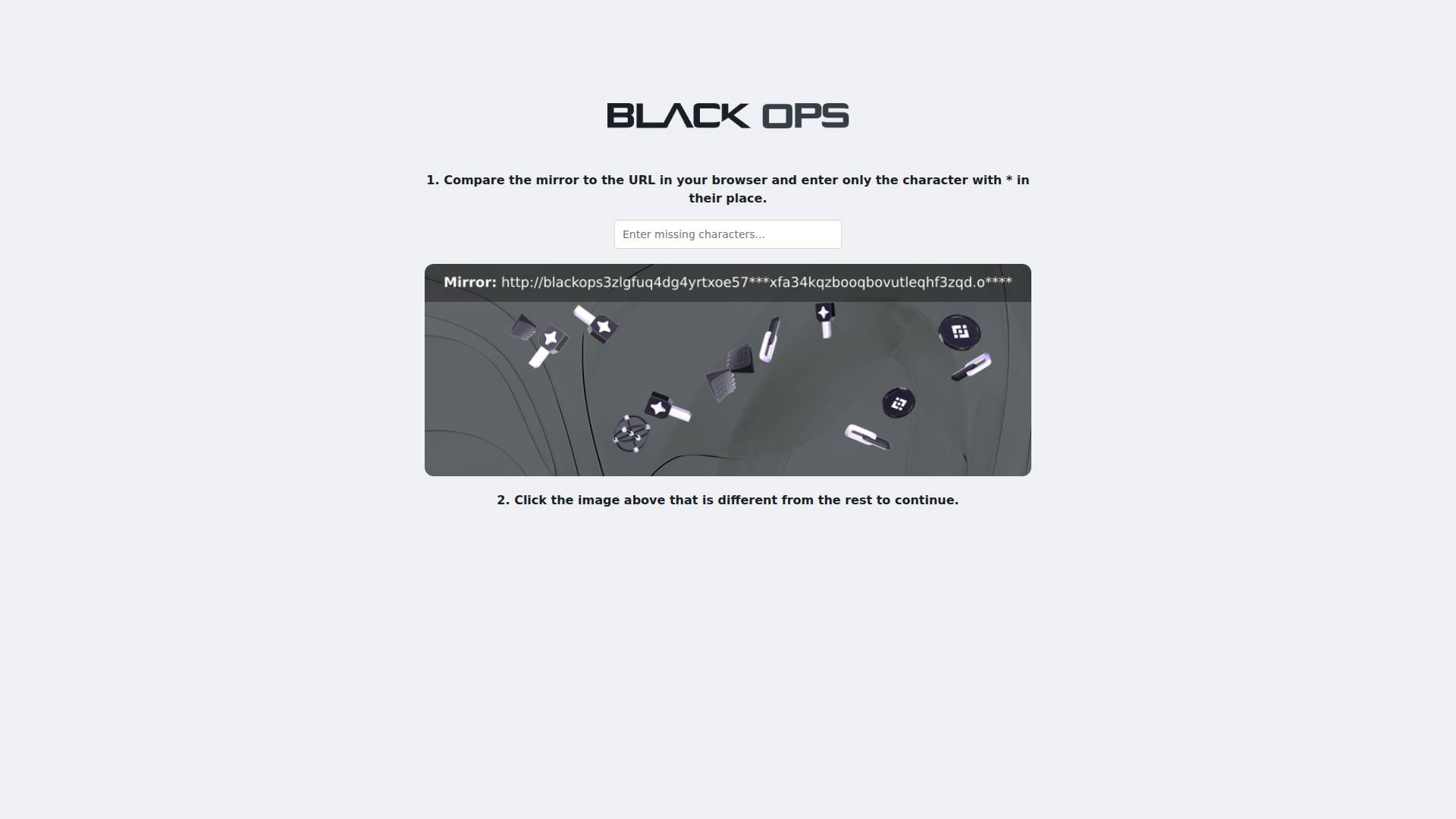
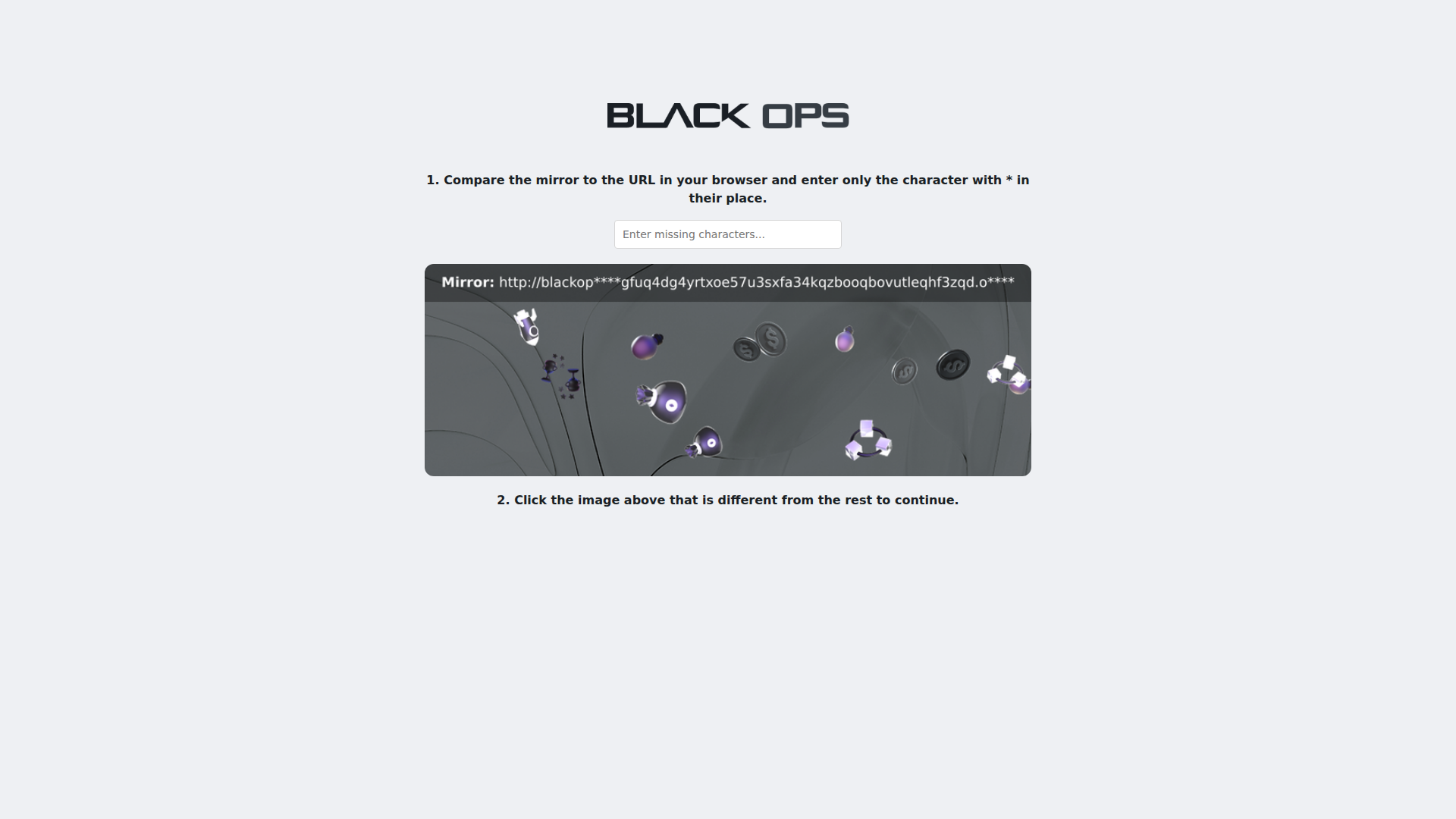
Round 1 — mirror OCR + Binance icon odd-one-out click challenge.
The Black Ops marketplace uses a fundamentally different captcha than DrugHub. Both parts are submitted as a single `<form method="post">`:
Part 1: Mirror URL Text Challenge (algorithmic)
- A dark banner image shows
"Mirror:"followed by the site's.onionURL - Some characters in the URL are replaced by asterisks (
*) - User types the missing characters only into
<input name="code" type="text"> - Example: If mirror shows
http://blackop**3zlg...and actual URL hasblackops3zlg..., answer iss3
Part 2: Odd-One-Out Image Click (vision)
- A grid of 3D-rendered objects/icons/shapes on a dark background
- Most objects look identical; exactly one is visually different
- User clicks the different one via
<input name="figure" type="image"> - Form submits
code=CHARS&figure.x=X&figure.y=Y
Key HTML structure:
<form method="post">
  <input name="code" type="text" placeholder="Enter missing characters...">
  <div class="img-container">
    <input name="figure" type="image" src="data:image/png;base64,...">
  </div>
</form>
Timing:
- Initial page load → 12s meta-refresh redirect
- Captcha page (title: "Captcha - Black Ops")
- On success → Title changes to onion domain → marketplace content loads
Adaptive Captcha Type Detection
Before running any solver, the system detects which captcha type is present:
type CaptchaType = 'broken_circle' | 'blackops_mirror' | 'altcha_pow' | 'simple_checkbox' | 'generic_vision' | 'none';

async function detectCaptchaType(page: Page): Promise<CaptchaType> {
  const html = await page.content();
  if (html.includes('name="code"') && html.includes('name="figure"')) return 'blackops_mirror';
  if (html.includes('name="cap_response"') || html.includes('id="cap_response"')) return 'broken_circle';
  if (html.includes('altcha-widget') || html.includes('altcha')) return 'altcha_pow';
  // ...
}| Signal | Captcha Type | Solver |
|---|---|---|
input[name="code"] + input[name="figure"] | Black Ops Mirror | solveBlackOpsCaptcha() |
input[name="cap_response"] | DrugHub Broken Circle | 3-phase waterfall |
altcha-widget | ALTCHA PoW | Existing PoW handler |
| Generic captcha title | Unknown | Generic vision solver |
Solver: `solveBlackOpsCaptcha()`
Black Ops
blackops mirror
Round 4 — string diff recovered truncated Gemini URL; element.click({ position }) submission.
Step 1: OCR Mirror URL + Extract Missing Characters (Gemini)
The mirror URL text is rendered inside an image (not as HTML text). Gemini reads it.
Prompt strategy:
This captcha shows a dark banner with "Mirror:" followed by a URL.
Some characters are replaced by asterisks (*).

The actual URL is: http://blackops3zlgfuq4dg4yrtxoe57u3sxfa34kqzbooqbovutleqhf3zqd.onion

Reply with ONLY two lines:
Line 1: The missing characters concatenated together
Line 2: The full mirror URL with asterisks
Key insight: Providing the actual URL in the prompt lets Gemini do the comparison directly.
Step 2: String Diff Cross-Check (algorithmic)
if (mirrorUrl.includes('*')) {
  let diffChars = '';
  for (let i = 0; i < mirrorUrl.length && i < actualUrl.length; i++) {
    if (mirrorUrl[i] === '*') diffChars += actualUrl[i];
  }
  missingChars = diffChars;  // deterministic — prefer over Gemini's extraction
}
This was the breakthrough — the string diff is deterministic and reliable, even when Gemini truncates the URL.
Step 3: Detect Odd-One-Out Figure (Gemini Vision)
This image shows a grid of 3D objects. All look similar except ONE that is different.
Return ONLY: {"x": NUMBER, "y": NUMBER}
maxOutputTokens: 512 (same lesson as Bug 2).
Step 4: Submit Form
await page.locator('input[name="code"]').fill(missingChars);

const clampedX = Math.max(1, Math.min(figureX, figBox.width - 1));
const clampedY = Math.max(1, Math.min(figureY, figBox.height - 1));

await Promise.all([
  page.waitForNavigation({ timeout: 30000 }).catch(() => {}),
  figureEl.click({ position: { x: clampedX, y: clampedY }, delay: 80 }),
]);Bugs Found & Fixes Applied (Black Ops)
Bug 1: Gemini Truncates Long URLs
Root cause: maxOutputTokens: 256 exhausted by URL tokens. Each character of a random .onion hash is a separate token.
Fix: Bumped to maxOutputTokens: 512. Ask for missing chars FIRST so critical data arrives before truncation.
Bug 2: JSON Prompt Caused Worse Truncation
Root cause: {"mirror": "http://...", "missing": "..."} JSON wrapper added overhead.
Fix: Abandoned JSON format. Used simple two-line format — missing chars first.
Bug 3: Figure Coordinates Outside Element Bounds
Root cause: Vision returned (831, 741) for an 800×280 element — coordinates were for the full-page screenshot.
Fix: Clamp: Math.max(1, Math.min(figureX, Math.round(figBox.width) - 1)).
Bug 4: Form Not Submitting via Mouse Events
Root cause: page.mouse.click() fires on the page, not the element. <input type="image"> requires element-originated click.
Fix: element.click({ position: { x, y } }).
Bug 5: Deprecated Gemini Model (404)
Fix: Update model string to current non-deprecated version.
Lessons Learned (Black Ops)
- Ask for the answer FIRST, the evidence SECOND. When Gemini truncates, you get the critical data.
- Provide context you already know. Giving Gemini the actual URL lets it compare directly.
- Deterministic string diff > AI extraction. Even partial OCR is useful with a known reference string.
- `element.click()` ≠ `mouse.click()` for form submission.
<input type="image">requires element-originated click. - Same `maxOutputTokens: 512` that solved DrugHub also solved Black Ops. Proven configuration transfers.
Success Rate (Black Ops)
| Component | Success Rate | Notes |
|---|---|---|
| Type detection | 100% | name="code" + name="figure" is unambiguous |
| Mirror URL OCR | ~60% | Often truncated, string diff recovers |
| String diff extraction | ~90% (when OCR returns *) | Deterministic |
| Overall text answer | ~70% | Combined OCR + diff |
| Figure odd-one-out vision | ~50% | Gemini spatial reasoning varies |
| Both correct (single attempt) | ~35% | Both parts must be correct simultaneously |
| Solved within 4 rounds | ~80% | 1 - (1-0.35)^4 ≈ 82% |
Part 4
AWazon Market — Elementless Captcha Breakthrough
The Problem: No Captcha Element
AWazon
broken circle
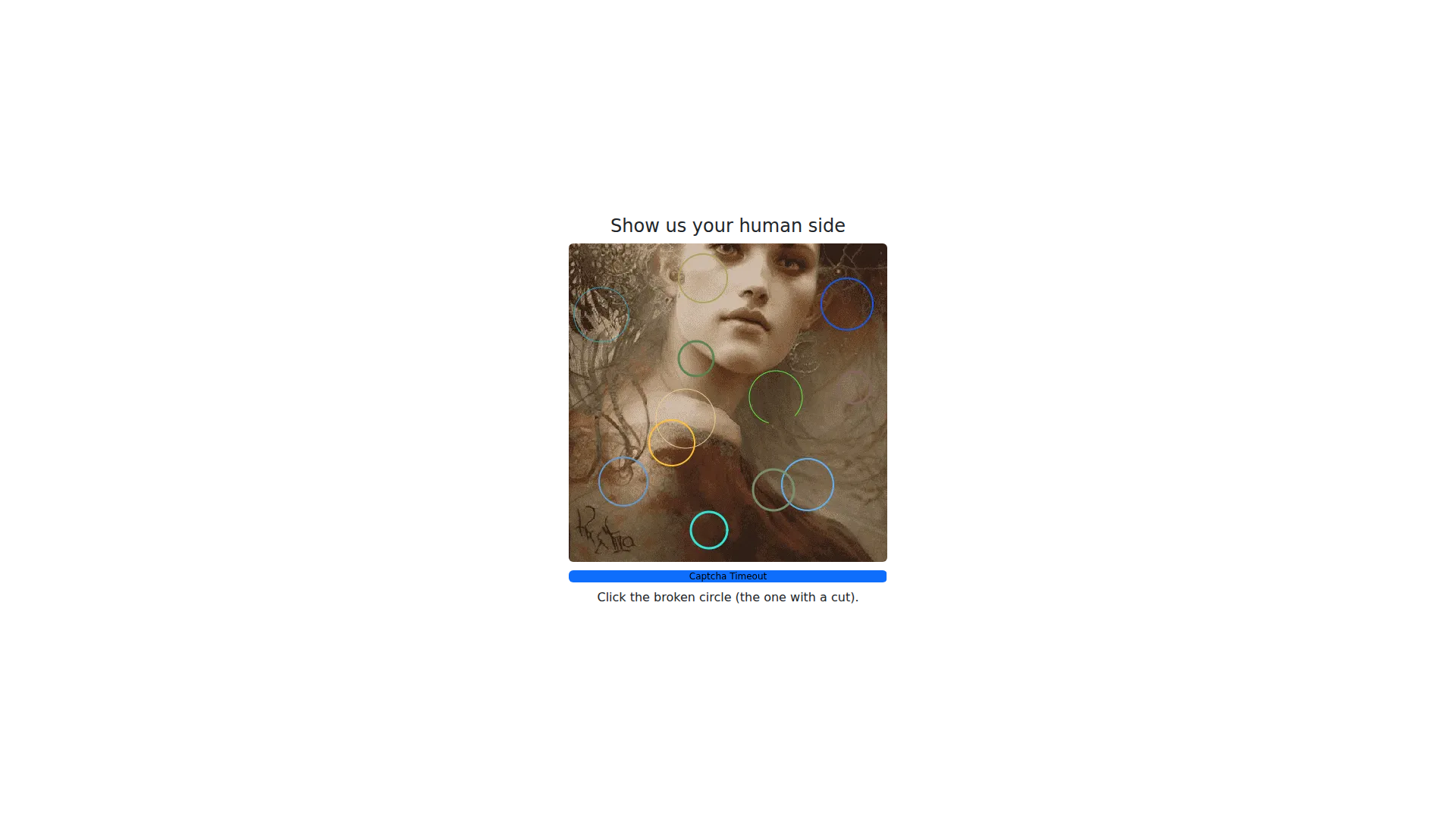
Elementless broken-circle page — viewport-coordinate fallback required (no cap_response element).
AWazon uses the same broken-circle captcha as DrugHub, but the captcha image is rendered without any discoverable HTML element.
DrugHub (worked):
<input name="cap_response" type="image" src="/captcha_image.png">AWazon:
Captcha page title: "AWazon Market - DDOS Protection". Text says "Click the broken circle (the one with a cut)" — but findCaptchaImageLocator() returns null for all known selectors (#cap_response, input[type="image"], img[src*="captcha"], canvas, generic img).
Pre-captcha flow:
- Initial page load →
"Access Queue"with spinner - 12–15s meta-refresh redirect to captcha page
- Captcha page with ~60 second "Captcha Timeout" progress bar
- On success → redirects to marketplace login/register page
Root Cause: Element-Dependent Solver Architecture
The entire 3-phase waterfall was built around finding a captcha HTML element. When no element existed:
| Phase | Failure mode |
|---|---|
| Phase 1 (algo) | Found broken circle at correct viewport coords → threw "No captcha image element found" → never clicked |
| Phase 2 (vision) | findCaptchaImageLocator() → null → continue → never sent to Gemini |
| Phase 3 (vision) | findCaptchaImageLocator() → null → threw → never ran |
Bugs Found & Fixes Applied (AWazon)
Bug 8: Element-Dependent Click Logic Blocked All Phases
Fix: Fall back to direct viewport clicking when no element exists:
if (captchaImg) {
  // Element found — coords are element-relative, convert to viewport-absolute
  targetX = box.x + algoResult.x;
  targetY = box.y + algoResult.y;
} else {
  // No element — algo ran on full-page screenshot, coords ARE viewport coords
  targetX = algoResult.x;
  targetY = algoResult.y;
}
Bug 9: `findCaptchaImageLocator()` Called 5+ Times (~2.5 Minutes Wasted)
Each call tries 7 selectors × 3s timeout = ~21 seconds when element doesn't exist. Called 5+ times = 2+ minutes of pure waste.
Fix: Cache result once, pass as parameter:
const cachedCaptchaEl = await findCaptchaImageLocator(page);
const algoResult = await solveAlgorithmic(page, cachedCaptchaEl);
const solved2 = await solveCroppedVision(page, apiKey, model, 3, cachedCaptchaEl);
const solved3 = await solveFullScreenVision(page, apiKey, model, 4, cachedCaptchaEl);
Impact: Solve time dropped from 6+ minutes → ~107 seconds.
Bug 10: Phase 2 `maxOutputTokens: 64` Truncated JSON (Again!)
Bug 11: Phase 1 Redirect Poll Wasted 45 Seconds
15 iterations × 3s = 45 seconds before Phase 2 could start. Captcha only gives ~60 seconds. Fix: Reduced to 5 iterations (15s).
Bug 12: Renderer Had No Overall Deadline
Fix: Added 150s render deadline with isDeadlineExceeded() checks before each phase.
Bug 13: Crawl Cancellation Did Not Discard Results
Fix: Added post-render status check to discard results if the crawl was stopped during render.
Performance Comparison
| Metric | Before fixes | After fixes |
|---|---|---|
findCaptchaImageLocator() calls | 5–7 per solve | 1 (cached) |
| Time on locator search | ~140 seconds | ~21 seconds |
| Phase 1 redirect poll | 45 seconds | 15 seconds |
| Phase 2 Gemini responses | Truncated | Valid JSON |
| Overall solve time | 6+ min (always timeout) | ~107–115 seconds |
| Renderer self-termination | Never | 150s deadline |
Lessons Learned (AWazon)
- Don't assume an element exists. Build viewport-coordinate fallback from day one.
- Cache expensive lookups. A 21-second function called 5 times = 2 minutes wasted.
- `maxOutputTokens` bites twice. Default to 512+ for any vision call. No exceptions.
- Budget time across phases. 60s captcha timeout − 45s polling = impossible solve window.
- Frontend stop must actually stop. Patch DB + discard in-flight results.
- The algorithmic solver won. Phase 1 solved AWazon on first click — viewport-coords approach avoids all coordinate mapping complexity.
WeTheNorth — Text Captcha Solver
WeTheNorth
text captcha
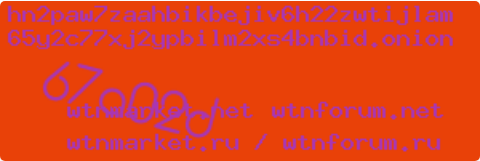
drawcaptcha4.php entry gate — 6-char hex OCR with honeypot form filtering.
WeTheNorth
text captcha
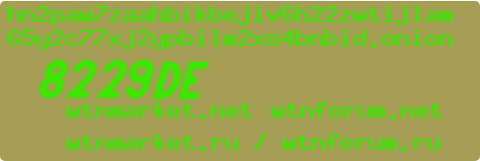
Alternate colorway — same OCR pipeline, 100% Round 1 solve rate in testing.
Captcha Format
The site uses a two-stage captcha architecture:
#### Stage 1: Entry Gate (drawcaptcha4.php)
- Large bold captcha characters (~6 hex chars like
714d1b) in center of image - Noisy background with
.onionURL at top and mirror domain names at bottom - Input:
placeholder="What's the captcha? - lowercase only" - Anti-phishing: 9 forms total — 3 honeypots (
name="fuckno",name="phishersucks",class="phishersucks"), only 1 visible real form with a random hexnameattribute
#### Stage 2: Login Page (jcaptcha.php)
- Not solved — requires credentials; entry gate bypass is sufficient
Anti-Phishing Defense
| Form Class | Input Name | Visible | Type |
|---|---|---|---|
| randomHex1 | randomHex | false | Decoy |
| randomHex1 | fuckno | false | Honeypot |
| randomHex2 | randomHex | false | Decoy |
| realClass | randomHex | `true` | Real form |
| randomHex3 | randomHex | false | Decoy |
phishersucks | phishersucks | false | Honeypot |
Detection strategy: page.evaluate() with getComputedStyle() + offsetParent to filter visible forms, then exclude known honeypot names.
Key Bugs Fixed
| # | Bug | Root Cause | Fix |
|---|---|---|---|
| 1 | maxOutputTokens: 64 | Copy-paste | Changed to 512 |
| 2 | Empty CSS class selector crash | form.${empty} | Use input[name="..."] directly |
| 3 | False "still present" after solving | Post-submit matched login page text | Check for title change to "Login" |
| 4 | jcaptcha.php treated as unsolved | No entry-gate vs login distinction | Separate detection per image source |
Success Rate (WeTheNorth)
| Component | Success Rate |
|---|---|
| Captcha detection | 100% (3/3) |
| Honeypot avoidance | 100% (3/3) |
| Gemini OCR (Round 1) | 100% (3/3) |
| Overall solve | 100% (3/3) |
Omega Marketplace — Sequential Character Captcha Solver
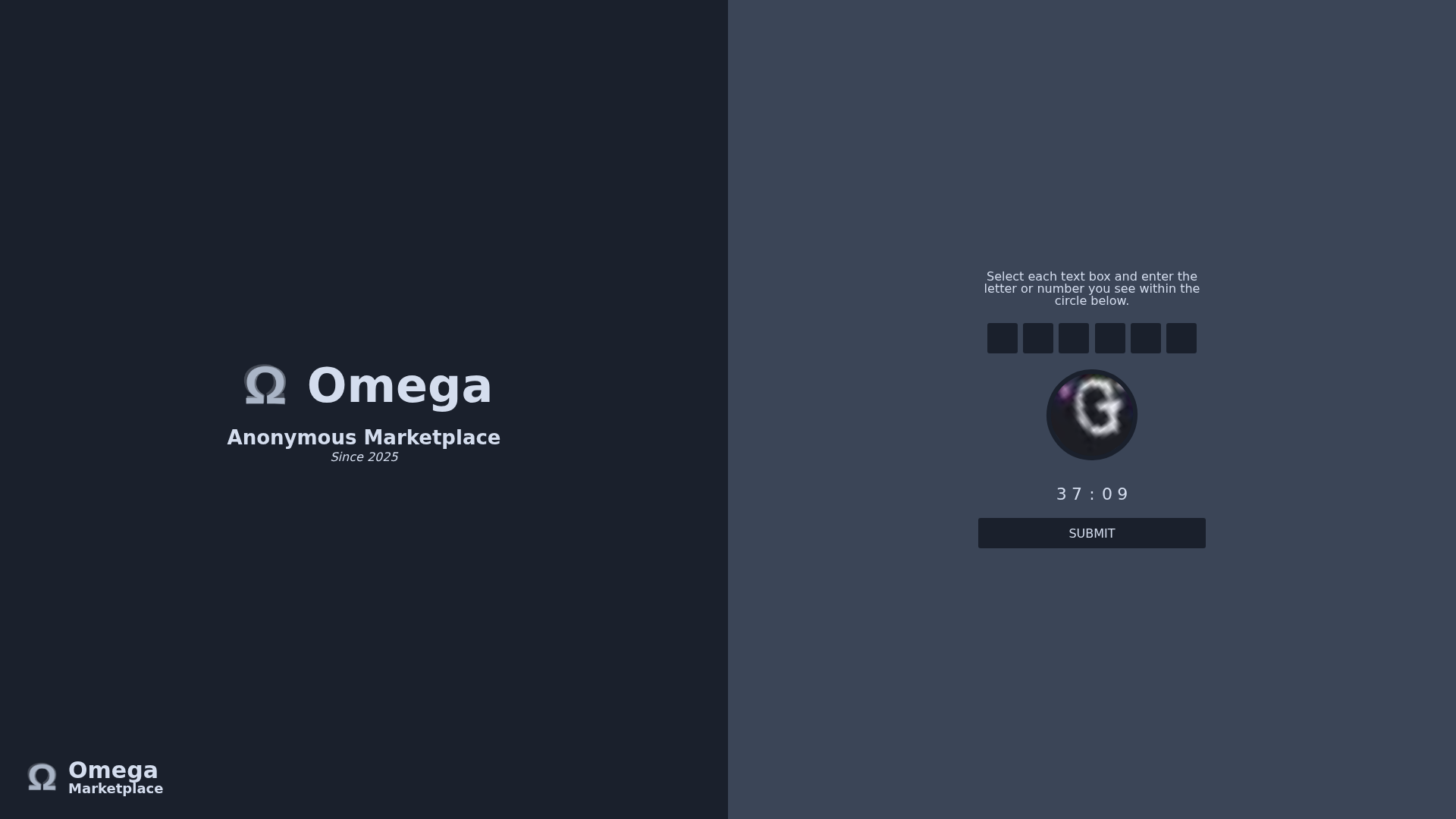
Omega
omega char
Full DDOS Protection page — JS-required image swap per input box (c1–c6).
Omega
omega char
Per-box circle crop — character 1 OCR at temperature 0.1.
Omega
omega char
Character 3 — heavy distortion; sequential solve retries up to 3 rounds.
Omega
omega char
Character 5 — circular crop sent to Gemini Flash with maxOutputTokens 512.
Multi-Stage Flow
1. Initial page load → meta-refresh redirect (~5s)
2. "Omega Market | Protection Layer" queue page (JS countdown ~10-15s)
3. "DDOS Protection" captcha page (6-char sequential captcha)
4. Submit → if correct → back to "Protection Layer" (success intermediate)
5. Auto-redirect → marketplace
Captcha Format
- 6 input boxes:
name="c1"throughname="c6",maxlength="1",pattern="[A-Za-z0-9]" - Circular image (~120–170px): photograph with a single distorted white character overlaid
- Image swapping: Clicking each input box changes the circle image via JS — shows that box's character
- Submit:
<button class="before" type="submit">Submit</button> - Timer: ~60s countdown
Critical Architecture Decision: JavaScript Required
Unlike all other .onion captchas solved (which work with JS disabled), Omega's captcha requires JavaScript for the image-swapping behaviour. Each input box triggers a JS handler that swaps the src of the circle image.
Solution: Create a separate browser context with javaScriptEnabled: true, navigate to the URL fresh, wait for the queue countdown, then solve in the JS-enabled context.
Solver Implementation
Type: omega_char
Model: gemini-flash
maxOutputTokens: 512
Temperature: 0.1 (deterministic reads)
Sequential: Focus each input → screenshot circle → OCR → type → repeat × 6
Success detection: Post-submit title changes from "DDOS Protection" to "Omega Market | Protection Layer" (success intermediate), then auto-redirects.
Queue Page Handling
- Poll every 5s for up to 90s
- Check for
name="c1"+name="c6"inputs to confirm captcha loaded - Handle
page.content()errors during navigation (page changing while checking) - Fall back after timeout
Key Bugs Fixed
| # | Bug | Root Cause | Fix |
|---|---|---|---|
| 1 | page reassignment error | Declared as const | Changed to let |
| 2 | targetUrl is not defined | Wrong variable name | Fixed reference |
| 3 | False "solved" on queue page | Queue page has no c1-c6 inputs | Wait loop polls for inputs |
| 4 | Navigation error in wait loop | page.content() during redirect | try/catch + waitForLoadState |
Success Rate (Omega)
| Component | Success Rate | Notes |
|---|---|---|
| Queue detection | 100% (3/3) | "Protection Layer" title detected |
| Queue → Captcha navigation | 100% (3/3) | Inputs appear within 10–15s |
| Per-character OCR | ~80% per char | Some chars misread with heavy distortion |
| Per-round accuracy (6/6 correct) | ~33% per round | All 6 must be correct |
| Overall solve (within 3 rounds) | 100% (3/3) | 1 - (1-0.33)^3 ≈ 70% but 3/3 solved |
Reference
Master Lessons — Applicable to Any New Captcha Type
14 rules validated across 4 sites
These rules have now been validated across 4 sites and 28 bugs. Apply them before touching a new captcha:
| # | Rule | Source |
|---|---|---|
| 1 | Default `maxOutputTokens: 512` for any vision call — never 64 or 128 | Bugs 2, 10 |
| 2 | Strip markdown fences before JSON.parse() on Gemini responses | Bug 1 |
| 3 | Always log parse errors — empty catch {} kills weeks of debugging | Bug 1 |
| 4 | Screenshot the element, not the page for coordinate accuracy | Bug 4 |
| 5 | Build viewport fallback — don't assume a captcha element exists | Bug 8 |
| 6 | Cache `findCaptchaImageLocator()` — never call it more than once per solve | Bug 9 |
| 7 | Treat navigation as success in post-click polling loops | Bug 6 |
| 8 | Use `element.click({ position })` not page.mouse.click() for <input type="image"> | Bug 4 (BlackOps) |
| 9 | Provide known context to Gemini — actual URL, known answer prefix, etc. | BlackOps Step 1 |
| 10 | Ask for the answer FIRST in multi-part prompts — truncation cuts from the end | Bug 1 (BlackOps) |
| 11 | Deterministic verification > AI when you have a reference string to diff against | BlackOps Step 2 |
| 12 | Human-like mouse movement — 45-step bezier, 300–500ms hover, random press delay | Bug 7 |
| 13 | Add a render deadline — Convex timeouts require explicit self-termination | Bug 12 |
| 14 | Save debug screenshots to `/tmp/` — mandatory from day one, not an afterthought | Section 6 |